SaaS User Onboarding Guide
Learn how to build effective SaaS onboarding flows using interactive product tours, contextual micro-copy, and action-oriented triggers to boost user activation rates.

User drop-off occurs most frequently within the first ten minutes of account creation, primarily driven by empty-state confusion and unnecessary friction. While conventional linear product tours often feel like invasive pop-up ads, modern SaaS onboarding relies on interactive product tours triggered by user actions paired with contextual micro-copy. Structuring these dynamic touchpoints systematically helps convert casual signups into active power users.
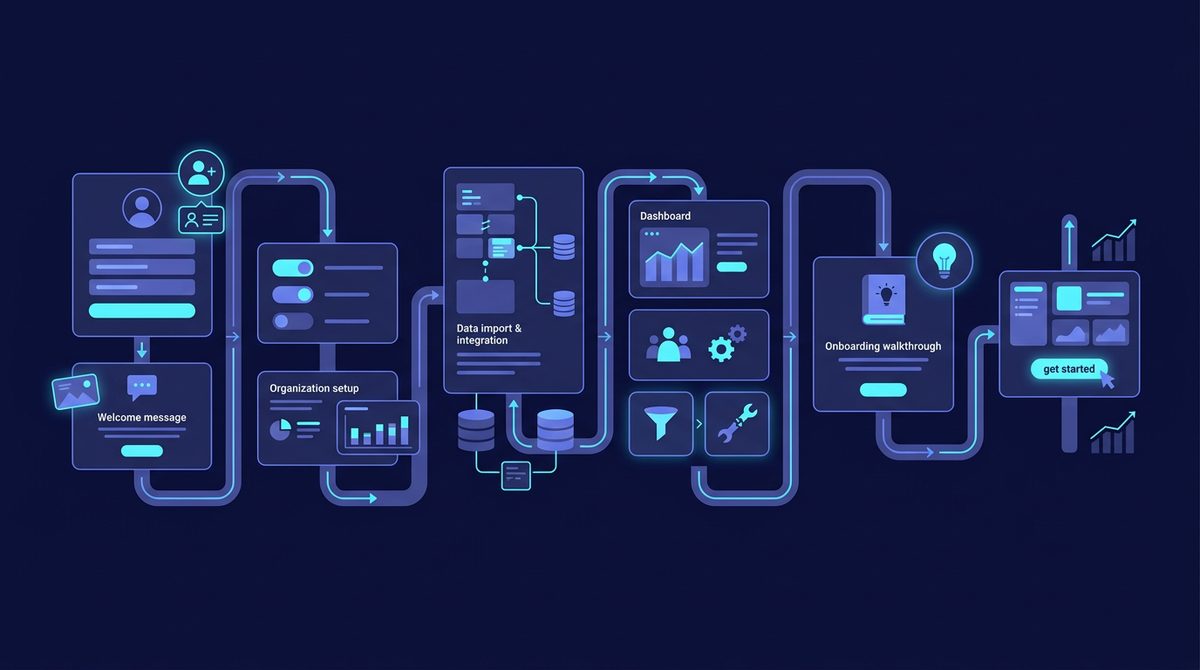
The Shift from Linear Tours to Action-Oriented Micro-Flows
Traditional multi-step modal tours often force users through ten sequential tooltips before allowing them to interact with the interface. This approach generates low retention because users forget the instructions immediately after clicking through the modals. Modern product-led SaaS architectures replace long, static tours with responsive micro-flows that trigger exclusively when a user reaches a specific threshold or attempts a primary action.
Instead of explaining how every button in the navigation panel works, effective micro-flows focus on guiding the user toward a single core setup action, such as connecting a data source, inviting a team member, or creating a first draft. By isolating these key actions into modular interactions, SaaS teams can reduce time-to-value (TTV) without overwhelming new signups.
Engineering Contextual Micro-Copy for High Conversion
Micro-copy refers to small snippets of instructional text placed directly alongside user interface elements—such as input fields, empty states, toggles, and button tooltips. High-converting micro-copy anticipates user hesitancy at critical friction points and provides immediate clarity without forcing the user to leave the application to read documentation.
To maximize the efficacy of your micro-copy, apply these structural guidelines across key touchpoints:
- Empty States: Replace empty tables with a brief explanation of what data will appear, accompanied by a primary call-to-action (CTA) button and a sample dataset preview.
- Form Fields: Include inline micro-copy beneath complex input fields explaining why the data is required and how it will be used (e.g., "We use this URL to pull your workspace favicon automatically").
- Permission Requests: Clarify the exact scope before triggering browser or API authorization prompts to reduce drop-offs caused by privacy concerns.
- Action Buttons: Use descriptive action-oriented verbs like "Generate API Key" or "Import CSV" instead of vague labels like "Submit" or "Next".
Interactive Tool Stack Matrix for 2026 Onboarding
Selecting the right engine for your onboarding stack depends on your technical resources, build preferences, and existing analytics tools. The table below compares current platform solutions used by growth teams in 2026 to orchestrate contextual tours and inline micro-copy.
| Platform | Primary Target | Key Onboarding Feature | Approx. Starting Price |
|---|---|---|---|
| Userflow | No-Code Product Managers | Event-triggered micro-tours & native checklist widgets | ~$200/month (billed annually) |
| Frontegg | Developer-first SaaS Teams | Embedded self-serve onboarding, identity & admin flows | ~$99/month (usage tiers) |
| Appcues | Mid-Market Growth Teams | Granular audience segmentation & visual onboarding builders | ~$249/month (billed annually) |
| CommandBar | Complex Product Dashboards | AI-assisted spotlight search, inline nudges & micro-surveys | Custom / Tiered freemium |
Note: Pricing, plans, and API limits change frequently. Please verify current pricing directly on each vendor's platform website.
Mini Case Study: Optimizing B2B Analytics Onboarding
A B2B analytics platform faced a severe activation hurdle: over 65% of new trial users dropped off on the initial dashboard screen because the interface showed empty charts until a tracking script was installed on their web app.
The team overhauled their user journey by replacing the static "Welcome to your dashboard" modal with an interactive micro-flow built on a three-phase activation model:
- Contextual Empty State: Instead of zeroed-out line graphs, the dashboard loaded synthetic sample data with a prominent header banner: "Viewing Demo Data. Connect your site to see real-time events."
- Step-by-Step Inline Guide: Clicking "Connect Site" launched an inline modal overlay with code snippets auto-customized with the user's workspace ID, accompanied by micro-copy reassuring them that script execution added less than 2ms of latency.
- Verification Trigger: As soon as the first backend API event pinged the server, the onboarding widget updated dynamically, firing a confetti animation and switching the UI to the live data view.
This contextual, action-driven flow increased the technical setup completion rate from 35% to 62% within the first 14 days of deployment, significantly lifting trial-to-paid conversion rates.
Measuring Onboarding Performance Metrics
Optimizing onboarding requires tracking specific behavioral events rather than relying solely on surface-level sign-up numbers. Instrument your product analytics platform—such as PostHog, Mixpanel, or Amplitude—to track these essential milestones:
- Activation Rate: The percentage of new signups that perform a pre-defined set of high-value actions (the "Aha moment") within their first 7 days.
- Time to Value (TTV): The elapsed time between account creation and the user completing their first core workflow.
- Onboarding Checklist Completion Rate: The percentage of users who finish all items in an embedded setup widget.
- Step-Specific Drop-off: Identifying the precise step in an interactive tour where users close the modal or abandon the application session.
Key Takeaways for SaaS Founders
Delivering an exceptional onboarding experience requires moving away from static linear slide-decks and designing responsive, action-based UI components. Focus on context: deliver the right guidance, to the right user, at the exact moment they need to complete a task. Tailor your micro-copy to remove uncertainty, eliminate blank slates with sample data, and align every element of your tour with a measurable activation metric.
Ready to audit and enhance your growth tech stack? Explore the curated directories on SaaSafi to discover the top analytics, onboarding, and customer engagement tools powering modern SaaS products.
Related reading on SaaSafi
- #saas onboarding
- #user retention
- #growth strategy
- #product design
- #saas tools
Frequently asked questions
What is a SaaS activation event?
An activation event (or 'Aha moment') is the specific action or set of actions a user takes that demonstrates they have received core value from your SaaS product, such as creating a project or inviting a team member.
How does contextual micro-copy differ from product documentation?
While user guides and help docs provide long-form technical references, contextual micro-copy consists of small inline text snippets located directly within the interface (like tooltips or form labels) that assist users without disrupting their flow.
How do I reduce drop-off during SaaS user onboarding?
Measure drop-off points using product analytics, remove non-essential fields, replace empty screens with sample data, and replace multi-step modal tours with action-triggered micro-tours.
SaaSafi Team
Editorial
Written by the SaaSafi Team — we test and track SaaS tools for founders and operators.
Get the weekly issue
One email a week: new articles, tool teardowns and pricing finds. No spam, unsubscribe anytime.


Comments
No comments yet — start the conversation.