SaaS Trial Conversion Tips
Boost your SaaS trial conversion rates with actionable behavioral email sequences, in-app triggers, and activation frameworks designed for SaaS growth.

Most SaaS trial users do not abandon your product because they hate it; they abandon it because they lost momentum before hitting their first meaningful win. Relying on generic, time-based drip emails like "Day 3: Check out our features!" creates a disconnect between what the user experiences inside the application and what lands in their inbox. To lift your SaaS trial conversion rate, you must orchestrate behavioral email sequences driven by real-time in-app triggers that guide users directly to their activation moment.
Mapping Activation Triggers to Behavioral Email Sequences
Time-based onboarding campaigns ignore user reality. If a user completes your core setup within ten minutes, sending them a basic setup guide on day three feels redundant and tone-deaf. Conversely, if a user gets stuck on step one, sending a day-five email promoting advanced integrations frustrates them.
High-converting SaaS onboarding shifts the logic from time elapsed to actions completed. By pairing product analytics tools like PostHog or Mixpanel with marketing automation platforms such as Customer.io or Userlist, you can trigger specific messaging workflows based on exact telemetry data.
- The "Stalled at Setup" Trigger: Fires when a user signs up but fails to complete a core action (e.g., inviting a teammate or connecting a data source) within 24 hours.
- The "Aha Moment" Trigger: Fires immediately after a user hits key usage thresholds (e.g., creating their first workflow or exporting a report).
- The "Feature Discovery" Trigger: Fires when a user repeatedly visits a high-value page or locked feature without completing the underlying task.
- The "Expiration Warning" Trigger: Fires dynamically based on remaining trial days, but customized by whether the user is activated or unactivated.
Constructing the Behavioral Email Sequence Framework
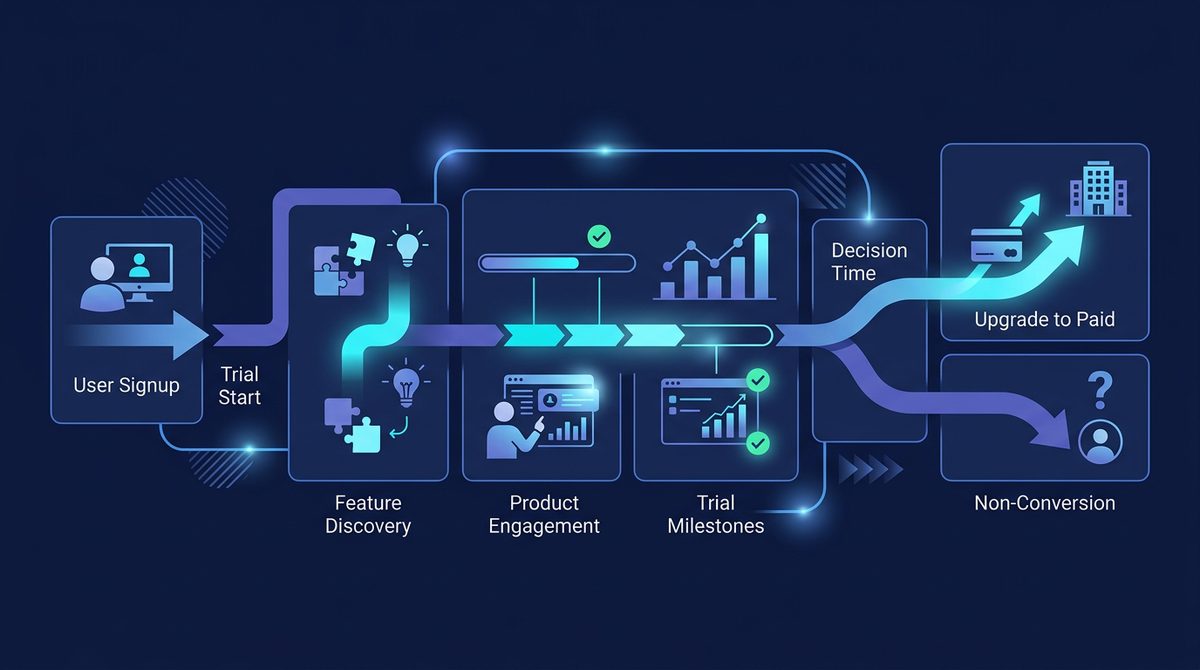
Instead of a linear drip sequence, visualize your trial lifecycle as three distinct paths: Unactivated Users, Activated Users, and Power Users. Each cohort requires a different psychological nudge to move closer to a paid subscription.
| User Cohort | Primary Goal | In-App Trigger Event | Messaging Focus |
|---|---|---|---|
| Unactivated | Reach first value ("Aha Moment") | Zero key events within 48 hours of signup | Friction removal, 1-on-1 offer for concierge setup, video teardown |
| Activated | Establish routine workflow | Core action completed 2+ times in 5 days | Case studies, team seat invites, usage reporting, tier highlights |
| Power Users | Convert to paid plan early | Usage approaches trial limits or hit usage caps | Custom discount for annual lock-in, ROI calculator, plan comparison |
1. Re-activating Stalled Trialists
When a trial user stalls, sending more feature feature-lists will not solve the issue. They hit a blocker—whether technical, organizational, or motivational. Your behavioral email should address friction directly, ideally appearing to come from a real founder or customer success specialist.
Keep these emails short, plain-text, and conversational. Rather than linking to broad documentation, direct them to a 60-second walkthrough video or offer a direct calendar link for a brief onboarding call.
2. Capitalizing on the "Aha Moment"
When a user experiences real value, their buying intent peaks. Send an automated email within 15 minutes of an activation event. Validate their success, show them the next natural step, and subtly demonstrate how paid tier features expand on the milestone they just achieved.
In-App Triggers: Catching Users at Peak Intent
Email operates outside your product, requiring the user to switch contexts. In-app triggers strike while the user is actively working inside your software, making them significantly more effective for driving immediate conversions.
Tools like Userflow or Appcues allow you to deploy contextual tooltips, banners, and modal dialogs triggered by dynamic segment rules without writing custom frontend code.
Contextual Paywalls vs. Hard Paywalls
Blanket hard paywalls during a free trial often induce drop-off if the user has not yet validated the software's utility. Contextual paywalls present payment prompts right when a user touches premium utility. For example, if a user on a free trial attempts to export an unwatermarked report or enable an advanced Webhook, prompt them in that exact moment with a clear upgrade path.
The Usage-Based Trigger Banner
If your pricing model relies on usage metrics—such as tracked contacts, processed API calls, or team seats—embed dynamic progress indicators directly into the dashboard navigation. When a user reaches 80% of their trial capacity, display an persistent, non-intrusive banner highlighting their current usage trajectory and offering a seamless one-click upgrade option.
Mini Case Study: Optimizing Trial Conversion for an API Monitoring SaaS
A B2B API monitoring platform was struggling with a 3.2% free-to-paid trial conversion rate on a 14-day trial. Analytics revealed that trialists who configured at least two API endpoints within 72 hours converted at 18%, while those who configured zero or one endpoint converted at under 1%.
The team overhauled their approach using targeted behavioral triggers across Customer.io and Userflow:
- Trigger 1 (In-App): If a user created an account but didn't set up an endpoint within 10 minutes, an interactive checklist modal appeared with pre-configured templates for popular APIs like Stripe and Twilio.
- Trigger 2 (Email): If no endpoint was added after 24 hours, an automated plain-text email sent from the CTO offered a pre-written cURL command to send dummy telemetry data instantly.
- Trigger 3 (Email & In-App): Once a user added two endpoints, an in-app banner unlocked a trial of advanced Slack alert routing, while an email sent an automated ROI summary showing uptime metrics gathered so far.
By focusing messaging entirely around the two-endpoint activation metric, the company lifted overall trial-to-paid conversion from 3.2% to 7.8% within 90 days.
Designing an Effective Expiration and Discount Sequence
The final 72 hours of a SaaS trial represent the highest-volume period for conversions. Many users simply wait until the last minute to make a purchasing decision. How you manage this window dictates whether your user upgrades, asks for an extension, or churns passively.
Avoid manipulative countdown timers or fake scarcity. Instead, provide clear, actionable information about what happens to their account data when the trial ends.
Pro Tip: Offer a trial extension only to users who completed activation milestones but ran out of time to evaluate thoroughly. Automatically offering extensions to unactivated users simply delays predictable churn.
For high-value activated users who remain uncommitted on day 13, present a soft offer: an annual plan upgrade discount or an option to extend the trial by 7 days in exchange for booking a brief feedback call. (Note: Tooling setups using Stripe Billing or Paddle can handle trial extensions and pro-rated upgrade paths via simple API calls; verify exact webhooks and API limitations on the respective vendor sites).
Key Takeaways for Higher SaaS Trial Conversions
Converting free trial users into long-term subscribers is an exercise in behavioral alignment. By replacing static broadcast schedules with event-driven automation, you create a responsive onboarding ecosystem that meets users where they are.
- Identify your primary activation milestone ("Aha Moment") and align all early messaging toward achieving it.
- Use behavioral emails to eliminate setup friction for stalled users, rather than bombarding them with feature tours.
- Deploy contextual in-app prompts and soft paywalls precisely when users interact with premium features or hit usage caps.
- Segment your end-of-trial campaign so activated users receive conversion incentives while unactivated users receive help.
Ready to upgrade your growth stack with the latest product analytics, onboarding, and email automation tools? Explore curated software solutions and software reviews in the SaaSafi tool directory to find the best tools for your SaaS business.
Related reading on SaaSafi
- #saas growth
- #trial conversion
- #onboarding
- #email sequences
- #product analytics
Frequently asked questions
How long should a SaaS free trial be for optimal conversion?
The ideal SaaS trial length depends on product complexity. Self-serve products with fast setup typically perform best with a 7-day or 14-day trial, as shorter periods create focused momentum. Enterprise products requiring complex data ingestion or team buy-in may require a 30-day trial or a guided opt-in sales process.
What is a good free-to-paid SaaS trial conversion rate benchmark?
A good trial-to-paid conversion rate varies by trial model. For opt-in free trials (no credit card required upfront), benchmark conversion rates typically hover between 3% and 8%. For opt-out free trials (credit card required upfront), conversion rates generally fall between 25% and 40%, though total signup volume is significantly lower.
How do you handle trial extension requests effectively?
Identify trial users who hit activation milestones but failed to convert due to timing issues. Send an automated email on the day of expiration offering a 7-day extension if they take a specific action, such as scheduling an onboarding session or inviting team members. Reserve extensions for engaged users to avoid delaying inevitable churn.
SaaSafi Team
Editorial
Written by the SaaSafi Team — we test and track SaaS tools for founders and operators.
Get the weekly issue
One email a week: new articles, tool teardowns and pricing finds. No spam, unsubscribe anytime.


Comments
No comments yet — start the conversation.